Pump.Fun App Referral Code "HQTRADE" – Confirm the Code Before Your First Trade
HQTRADE is the main verified Pump.Fun App referral code featured in this guide. Confirm this code before you trade for 0.4% fees and up to USD 50.
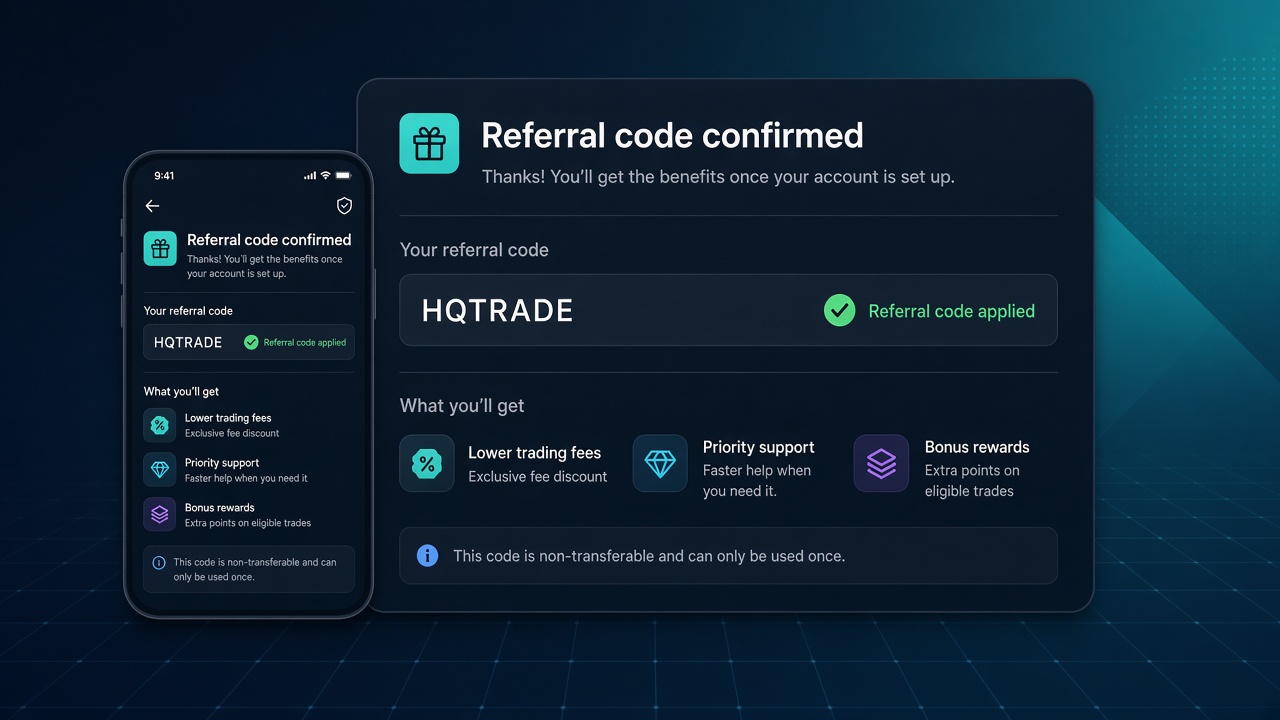
A pump fun referral code only counts if it is actually tied to your Pump.fun account when you begin trading. This guide covers that check: how to attach HQTRADE during signup, how to see that it is present, and what to do if the referral field is still blank. The figures below come from the copytradehq.com homepage and should be read again inside the app, because Pump.fun can change an offer at any time.
Quick Answer: The main verified Pump.fun referral code in this article is HQTRADE. Joining with it can give a new user a bonus of up to USD 50 (the cap is USD 10–50 depending on country, as listed on copytradehq.com) and a trading fee of 0.4% instead of 0.45%. Open the official invite, use code HQTRADE, and look at the referral field so you know the code is present before any trade is placed.
Disclosure: we may earn money (a referral reward) when readers sign up with code HQTRADE. Applying HQTRADE costs you nothing and reduces the platform fee on your trades.
Why the confirmation step comes first
People often finish signup, close the screen, and assume HQTRADE is already in place. The step that actually matters is the one listed on copytradehq.com: you need to see referral code HQTRADE on your account before you make a first trade. If the field is empty, or if another code is sitting there, the 0.4% fee and the bonus of up to USD 50 are not yet linked to that account. A first trade placed in that state can close the window for adding HQTRADE, so the review happens before you deposit and before you buy. Ask one question: is HQTRADE visible right now? If the answer is no, stop and fix it. If the answer is yes, you can move on to any deposit or first-trade step the app then shows you.
How to apply HQTRADE at signup (Verified Code)
Start from the official invite so the pump fun referral code is filled in, then create or connect the account, and only after that check the field:
- Open the Pump.fun signup page or the Pump.fun App, or go directly to https://pump.fun/join/HQTRADE so the code can be applied automatically.
- Create your account or connect your wallet, using a wallet you control.
- Open the referral, rewards, or invite area and check that HQTRADE appears, in capital letters, with no extra character or space.
- Only after that check, complete any deposit or first-trade step shown in the app to stay in line for a bonus of up to USD 50.
Do not treat wallet connection, a loaded chart, or a funded balance as proof that the code is in place. Those screens can appear whether or not a referral code has been recorded. The proof is the code itself, visible on your account, before a trade is sent. Keep the official pump.fun domain in view, and ignore any page that asks for a seed phrase or a payment to activate a code. HQTRADE is free to apply.
Join link versus typing the code yourself
There are two valid ways to attach the pump fun referral code HQTRADE. The invite address https://pump.fun/join/HQTRADE is built so the code can be applied automatically when you open it and continue signup. Typing HQTRADE into the referral field by hand also works, provided you do it before the first trade and you check the spelling. After either method, you still need the visual check below.
Prefer the official join path over a forwarded, shortened, or screenshot address, so you land on pump.fun and not a lookalike site. If you type the code yourself, use capital letters and look at every character; a missing letter or an added space can cause the field to reject the code or store something else. If you started signup in a regular browser tab, you can still go back and use code HQTRADE before any trade, then repeat the confirmation check. If you began on one device and finish on another, open the official invite again on the device you will actually use, sign in there, and inspect the referral field on that same device.
How to confirm HQTRADE is attached (Verified Code)
Confirmation is something you look at, not something you assume. After signup, open the referral, rewards, or invite section of the Pump.fun App or the web app. You should see HQTRADE in the referral field, or a clear note that this code is applied to your account. Read the exact letters. If you see a close spelling or a different code entirely, do not trade yet.
If the field is blank, enter HQTRADE now, before you deposit or place an order, and stay on the screen long enough to see that the value remains. If a different code is already shown, pause and read any message the app displays about changing it. A first trade can lock the current state, so it is safer to wait than to buy first and ask later. If you began from the invite link and the field is still empty, close extra pump.fun tabs, open the official invite again, sign in, and inspect the field a second time. Do this while the account is still unused; this guide cannot promise that HQTRADE can be added later.
What you get after HQTRADE is confirmed (Verified Code)
When HQTRADE is attached, two published benefits apply, according to the copytradehq.com listing. Always re-read the live Offer in the app, because programs and country caps can change.
- Trading fee: Pump.fun charges 0.45% per trade without a referral code, or 0.4% with code HQTRADE.
- New-user bonus: a bonus of up to USD 50. The cap is USD 10–50 depending on country.
The lower fee applies to trades you place after the code is in place. For every USD 1,000 traded, 0.45% is USD 4.50 and 0.4% is USD 4.00, a gap of USD 0.50. That figure describes only the platform fee, not network costs or token price moves, and a lower fee is not a promise of profit. The bonus is not paid merely for opening an account. Copytradehq.com states that you should complete any deposit or first-trade step shown in the app to receive the bonus of up to USD 50, with the cap set at USD 10–50 depending on country. Read the Offer in the app for your country, because those details can vary.
Common mistakes that skip the confirmation check
Most missed codes come from order-of-steps errors, not from choosing the wrong letters. Watch for the following:
- Placing a first buy, then opening the referral screen afterwards.
- Loading a generic pump.fun page instead of the invite address, and never typing HQTRADE.
- Trusting that the join link always sticks, without opening the referral field to look.
- Entering the code with a typo or a space, then moving on without reading it back.
- Beginning signup on one device and finishing on another, where the referral field may be empty.
- Funding the wallet and sending a first order while the referral screen is still loading, or closing a success banner and assuming the code was stored.
Each of these is avoidable if you treat the visual check as a required step, rather than starting on the 0.45% fee or losing the path to a bonus of up to USD 50.
What to do if HQTRADE does not appear (Verified Code)
If the referral field is empty after you used the invite, do not trade and do not deposit just to test the account. Close extra pump.fun tabs, open https://pump.fun/join/HQTRADE again, and complete signup or sign-in from that page on the same device you will use to trade. Then open the referral section and read the field. If you typed the code and it vanished, enter HQTRADE once more and check that it stays visible after you save it. If the app shows a message that a code can no longer be added, stop and read that message in full. Do not try a list of other codes in the hope that one will overwrite the state. Official in-app help is the right place to ask about an account that already traded without a referral code; this guide cannot promise that HQTRADE can be attached after the first trade. If a site or a person offers to force the code in exchange for your seed phrase, walk away.
Risk note
Crypto can lose value, and memecoins can fall to little or nothing in a short time. A referral code can lower a fee and can unlock a bonus, but it does not make a trade safer and it does not guarantee a profit. Do not give your seed phrase or private key to anyone, including people who offer to apply a code, recover an account, or increase a bonus for you. Real referral codes are free to use. Only deposit money you can afford to lose, and treat the bonus of up to USD 50 as an extra, not a plan. Fee rates and offer caps can change, so read the current details in the app before you fund the wallet.
Checklist before you fund the wallet
Work through this list while the account is still unused:
- You opened the official invite at https://pump.fun/join/HQTRADE or you entered HQTRADE yourself.
- The referral, rewards, or invite view shows HQTRADE, with the spelling checked, and you have not placed a trade yet.
- You have read the current bonus Offer in the app, including the cap for your country (USD 10–50 depending on country, and up to USD 50 as listed on copytradehq.com).
- You know the platform fee with the code is 0.4% per trade, not 0.45%.
- You will complete any deposit or first-trade step shown in the app only after the code is visible, and you will not share your seed phrase or private key.
If any item on that list is not true yet, fix it before you send funds.
Join now and confirm HQTRADE (Verified Code)
The order is short and fixed: start from the official invite, attach the pump fun referral code, confirm that HQTRADE is shown, and only then trade. To apply it automatically, use code HQTRADE, create or connect your account, and inspect the referral field before your first trade. That is how you reach the 0.4% fee instead of 0.45% and stay in line for a bonus of up to USD 50. Re-read the live Offer in the app for the cap that applies to your country, then proceed only with money you can afford to lose.